
Customer Portal
All your policies at one portal across multiple devices.
Simplify the way you manage your insurance with us.
Our secure online portal provides AmMetLife policy owners with a single, convenient hub to access all their policy information from any device. View a summary of your coverage, make premium payments, and manage your account with ease, all in one place. It's an intuitive and efficient way to stay on top of your policies, giving you peace of mind and control right at your fingertips.
MyPortal - AmMetLife
Access your life insurance details securely from any browser. Ideal for managing multiple policies, viewing statements, and completing service requests with ease on a larger screen.
Supported desktop browsers include Chrome 21+, Internet Explorer 11+, Firefox 20+, Safari 7.0+, and Edge 25+.
i.AmMetLife Mobile App
Unlock a world of convenience and control with the i.AmMetLife mobile app. Exclusively for AmMetLife policy owners, you can now access and manage your policies, update contact information, and make secure e-payments with just a tap!
Download now on iOS & Android.
Open Apple Store / Google Play Store on the phone and look for"i.AmMetLife" OR scan the QR Code below to download from the app.
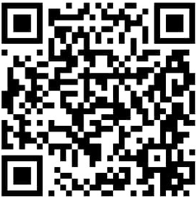  | 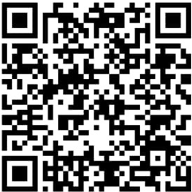  |
i.AmMetLife App
Ready to dive in?
How to start? Forgot your username or password? How to make a payment? Look no further. Here’s your trusted user manual, packed with everything you need to kick-start your journey.
Click Here for User Manual
Key Benefits
View and update your policy details. See your benefits and beneficiaries details, and more!
Pay your premiums and never miss a due date, while also conveniently performing your single Top-Up as per your preference.
Enhance your submission process with seamless access to relevant e-forms at your fingertips for quicker download.
FAQ
Find answers to commonly asked questions by browsing the list of topics.
— About Customer Online Portal
Both My Portal and i.AmMetLife are self-service portal/application for AmMetLife policy owners. You can view the policy details, make e-payment for your premiums, self-manage your information to update your policy’s profile.
- My Portal and i.AmMetLife are open to all AmMetLife policy owner with at least one (1) active policy.
- Upon successful registration, you will be able to access the policy information made available within My Portal and i.AmMetLife. However, access to My Portal and i.AmMetLife is only available to all new and existing customers with a valid policy with AmMetLife.
- There are products that are not supported by My Portal and i.Ammetlife. If you are unable to view your policy, please call our Customer Care Centre at 1300 88 8800 or email customercare@ammetlife.com for assistance.
There is no expiry date for My Portal and i.AmMetLife. However, your account will automatically deactivate if you do not login for 365 days from your last login date.
- Easy access to your policy details.
- Make payment for outstanding premium, Automatic Premium Loan (APL), Policy Loan (PL)
- Download e-policy, e-statements, e-letters, e-notification, e-receipt and other e-forms
- Update your contact details & selected servicing request
- Locate branches, panel clinics and panel hospitals.
You may perform the following transactions:
- View full policy details and benefits
- View premium details
- Update contact details (mobile, email address, correspondence / residential address, and residential contact numbers)
- Update bank account details (Electronic Funds Transfer)
- Remit online payment
- Manage funds online (Single Top-Up)
- Update of Payment Mode
- Download policy contract
- Download e-statements/e-notices
— Registration
You can sign-up for My Portal account with 3 easy steps:
1. Visit the AmMetLife webpage at: https://www.ammetlife.com
2. Click on “Login” at the top right of the page and select “My Portal”
3. Follow the easy instructions to register for your My Portal account.
Alternatively you may download the i.Ammetlife app from Google Play (Android User) or App Store (iOS user) & click sign up for your account. To enjoy the best experience of our app services, we recommend you having the latest operating systems updated on your mobile devices. The recommended versions:
- iOS 12 and above
- Android 10 and above.
You can bind up to a maximum of 3 devices. If you have bound up to 3 devices, upon 4th device binding, you will be prompted to remove one of the devices.
Select the device that you want to unbind, login and go to My Profile > Tap ‘Remove bind’.
— Username | Login ID | Password
My Portal
2.Key-in your My Portal registered email address, then "Submit" 3. Retrieve your Username at your registered email address
| i.Ammetlife App
2. Tap ‘Forgot Username’ and enter your registered email and NRIC/ other ID number. 3. Username will be sent to your registered email. |
My Portal 1. Go to the login page and click the "Forgot Password" tab. 2. Key-in your username and NRIC/Passport/ Other ID number, then click "Next". 3. Answer your security question, then click "Next". 4. Click on the link provided in email sent to your registered email address. 5. Key-in "New password" and repeat to confirm, then click "Submit". 6. Receive a confirmation email upon the successful change of password. | i.Ammetlife App 1. Tap ‘Need Help’ on the login screen. 2. Tap ‘Forgot Password’ and enter your username and registered NRIC/ other id no. 3. An OTP will be sent to your registered mobile number. Thereafter, a prompt will ask you to change your password. If you have not registered a mobile number you will be required to answer one security question. |
- Tap ‘Unlock Account’ and enter your username and registered NRIC/ other ID number.
- An OTP will be sent to your registered mobile number. Thereafter, you will be directed to change your password. If you have not registered a mobile number, you will be required to answer one security question.
IMPORTANT
This Frequently Asked Questions (FAQs) are subject to further updates as and when necessary in compliance with company’s policies and national regulatory requirements. Please login as often as you wish for the latest news, information and updates.